
BLACKFRIDAY is here!

    Get 40% off
    Armox
    Armox Academy 📚
    Introduction
    Quickstart Guide
    Understanding Brains
    Nodes
    AI Models
    The Canvas Editor
    Train LoRA
    Train MiniMax H3 LoRA
    Prompt Engineering
    Nano Banana ProFlux ModelsVideo PromptingAudio Prompting
    Text Nodes
    Image Nodes
    Video Nodes
    Audio Nodes
    Upload Nodes
    Tool Nodes
    3D Nodes
    Connecting Nodes
    Running Workflows
    What are Apps?
    Building Your First App
    Running Apps
    App Ideas for Creatives
    API Reference Introduction
    AuthenticationModels EndpointApps EndpointJobs EndpointAccount EndpointWebhooksErrors & Rate Limits
    The Gallery
    Downloading & Exporting
    Using AI Chat
    Brainstorming with AI
    Text Models
    GPT-5.4Gemini 3.1 ProClaude Opus 4.6GPT-5Gemini 2.5 FlashClaude 4.5 SonnetDeepSeek V3.1Grok 4Llama 3 70BLlama 3 8B
    Image Models
    Nano BananaNano Banana 2Nano Banana ProGPT Image 2.5Flux 2 ProKrea 2 LargeKrea 2 MediumFlux 2 FlexFlux 2 DevFlux 1.1 Pro UltraGrok ImagineFlux Kontext MaxFlux Kontext ProSeedream 4Seedream 4.5Wan 2.2 ImageQwen ImageQwen Image Edit AnglesStable Diffusion XLGrok 2 ImageGen4 Image
    Video Models
    Kling V2.5 Turbo ProKling 2.6 ProGrok VideoVeo 3.1Veo 3.1 FastSeedance 1 ProSeedance 1 Pro FastSeedance 1 LiteSeedance 2.0Wan 2.6 I2VWan 2.6 T2VWan 2.5 I2VWan 2.5 T2VSora 2 ProSora 2Hailuo 2.3Hailuo 2.3 FastVideo-01 DirectorGen4 Aleph
    Audio Models
    MusicGenMusic 1.5Music-01Lyria 2Speech-02 TurboSpeech-02 HDVoice CloningXTTS-v2
    Tool Models
    Topaz Image UpscalerPrunaAI UpscaleCrystal UpscalerRemove BackgroundFace SwapImage FiltersProfessional HeadshotText RemovalInpaintAdd WatermarkVideo Upscale (Runway)Video Upscale (Topaz)Video Upscale (Bytedance)Lip Sync ProAuto CaptionReplace CharacterMotion Transfer
    3D Models
    Hunyuan3D V3
    Social Media Content
    Product Photography
    Marketing Campaigns
    Video Production
    Audio & Music
    Multi-Step Workflows
    Image-to-Image
    Consistent Style
    Credit Optimization
    Common Mistakes
    Keyboard Shortcuts
    Examples Gallery
    Prompt Library
    Seedance 2.0 for AEC
    Enterprise Overview
    Admin Dashboard
    Requesting Credits
    FAQ
    Understanding Credits
    Troubleshooting
    Core ConceptsTrain LoRA

    Train LoRA

    Train LoRA lets you create a reusable custom style from your own images. Use it for consistent portraits, product shots, interiors, or brand aesthetics.

    Video Explanation


    How It Works

    1. Upload at least 3 images of the same style, face, or object.
    2. Start training and wait until the status is Ready.
    3. Use your trained LoRA directly with Flux models.
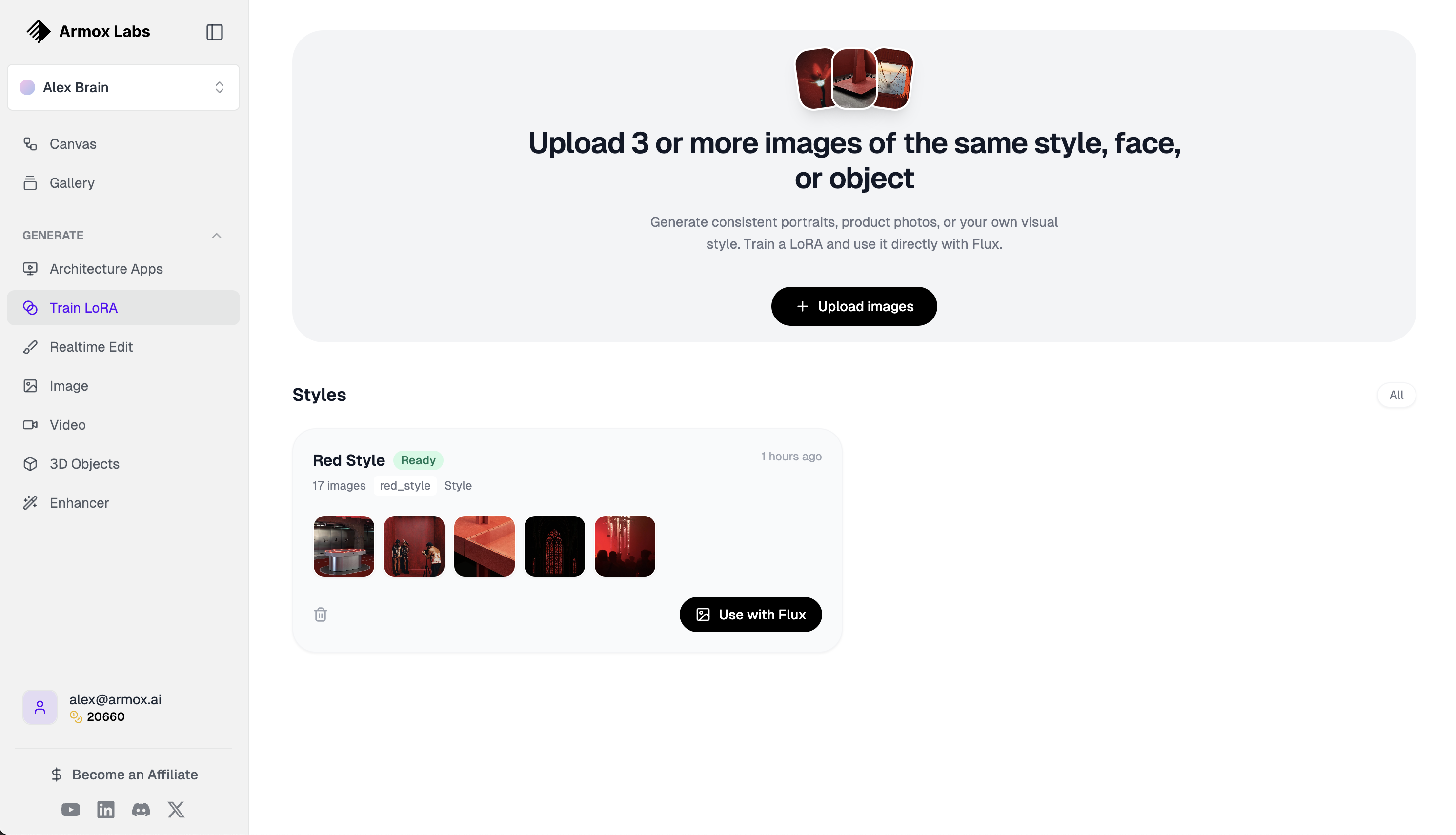
    Train LoRA screen in Armox


    Best Practices

    • Use clear, high-quality images with consistent lighting.
    • Keep the same subject/style across uploaded samples.
    • Mix angles and framing to improve robustness.
    • Avoid unrelated images in the same LoRA set.

    Where to Use It

    Once trained, your LoRA can be reused in image workflows to keep outputs visually consistent across campaigns and generations.

    Train Video LoRAs with MiniMax H3

    Choose MiniMax H3 in the new-training model selector to train from video clips. See Train a MiniMax H3 LoRA for dataset preparation, the two trainer choices, pricing, and generation steps.

    PreviousThe Canvas Editor
    NextTrain MiniMax H3 LoRA

    Ready to transform your creative workflow?

    No credit card required500 free credits

    On this page

    Video ExplanationHow It WorksBest PracticesWhere to Use ItTrain Video LoRAs with MiniMax H3