
Image 节点(Image Nodes)
Image nodes 是视觉创作真正“出图”的地方。它们使用 AI 模型从文本 prompts 生成图片,或基于参考图对已有图片做变换。
Image Nodes 是什么?
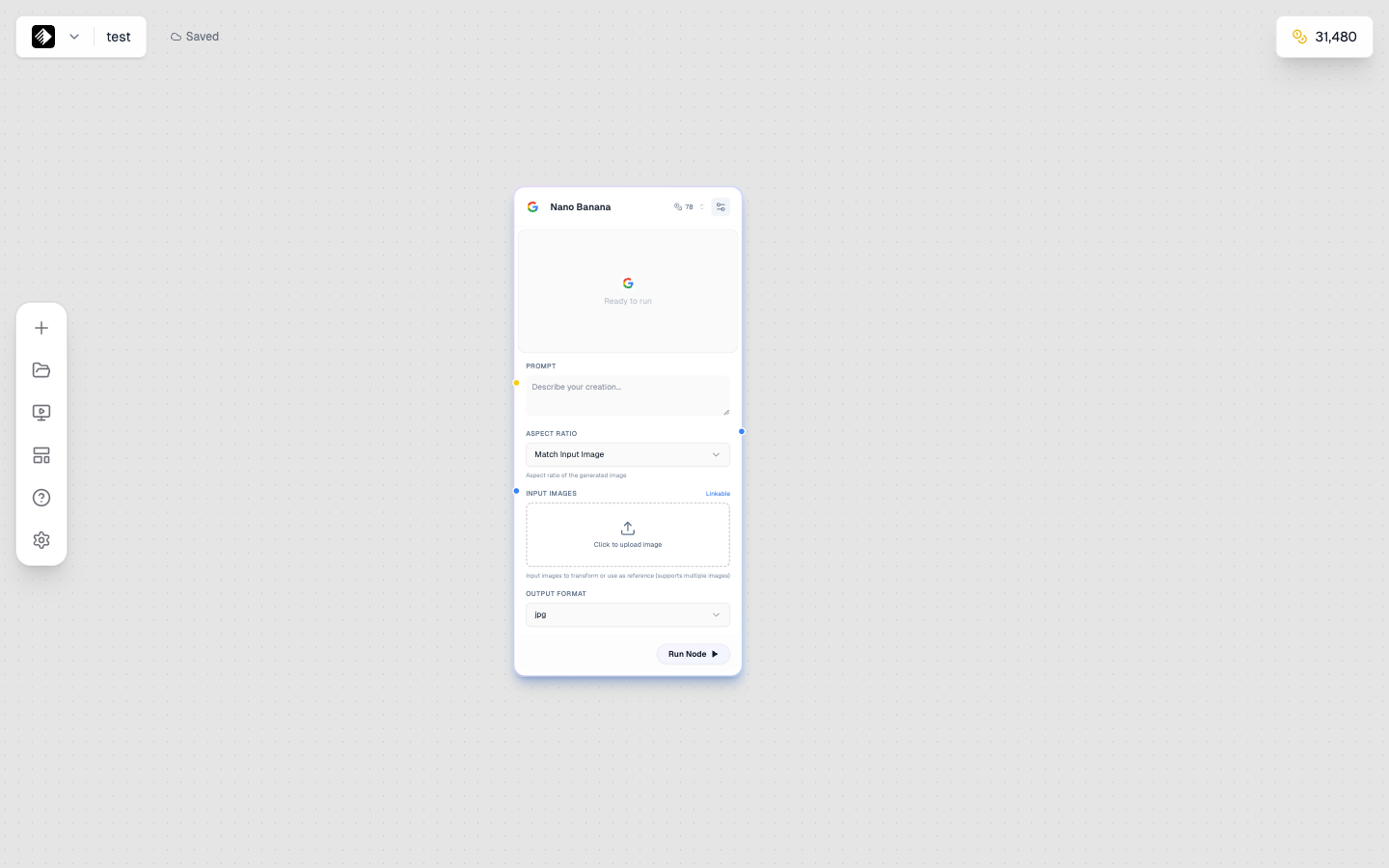
一个选择了 Nano Banana 的 Image node,用于 AI 图像生成。
Image nodes 使用 AI 生成图片,它们可以:
- 🎨 从文本生成 — 你描述想要什么,就生成图片
- 🖼️ 变换图片 — 用参考图引导生成
- 📐 控制输出 — 设置尺寸、风格与质量
添加 Image Node
- 打开左侧 node sidebar
- 在列表中找到 Image
- Drag 到画布上
Image Node 输入(Inputs)
Image nodes 接受以下输入:
| Input | Type | Required | Purpose |
|---|---|---|---|
| Prompt | Text (yellow) | Yes | 描述要生成的图片 |
| Reference Image | Image (blue) | No | 风格或内容参考 |
连接 Prompt
- 添加一个包含 prompt 的 Text Node
- 从 Text Node output 连接到 Image Node 的 prompt input
- 或直接在 Image Node 的 prompt 字段中输入
连接 Reference Image
- 添加一个带参考图的 Upload Node
- 从 Upload Node output 连接到 Image Node 的 image input
- AI 会将其作为参考
Image Node 设置(Settings)
模型选择(Model Selection)
从可用 AI 模型中选择:
| Model | Credits | Best For |
|---|---|---|
| Qwen Image | 20 | Quick tests, iterations |
| SDXL | 40 | Artistic styles |
| Flux 2 Dev | 50 | Good quality, balanced |
| Nano Banana | 78 | Text in images |
| Flux 2 Pro | 120 | Professional quality |
| Flux Kontext | 120 | Image editing |
| Nano Banana Pro | 600 | Highest quality |

模型选择器:展示所有可用图像模型。
画幅比例(Aspect Ratio)
控制输出尺寸比例:
| Ratio | Dimensions | Best For |
|---|---|---|
| 1:1 | Square | Instagram, profile pics |
| 16:9 | Landscape | YouTube, presentations |
| 9:16 | Portrait | Stories, TikTok |
| 4:5 | Portrait | Instagram feed |
| 3:2 | Landscape | Photography |
| 21:9 | Ultra-wide | Banners, headers |
其它设置(Additional Settings)
| Setting | Description |
|---|---|
| Guidance Scale | 对 prompt 的贴合程度(越高越“照着做”) |
| Steps | 生成质量(越多越好但更慢) |
| Seed | 用于复现结果的随机种子 |
| Style | 预设风格(因模型而异) |
文生图工作流(Text-to-Image Workflow)
最常见的用法:
Prompt Template
[Text Node] → [Image Node]
Your prompt → Generated image
Example
- 添加一个 Text Node
- 写: "A cozy coffee shop interior, morning light, warm tones, photography"
- 添加一个 Image Node
- 连接 Text → Image
- 选择模型(例如 Flux 2 Dev)
- 点击 Run
图生图工作流(Image-to-Image Workflow)
使用参考图引导生成:
Prompt Template
[Upload Node] → [Image Node]
Reference image → Transformed image
Example:风格迁移(Style Transfer)
- 添加 Upload Node
- 上传参考图
- 添加 Image Node
- 连接 Upload → Image(image input)
- 添加一个带风格描述的 Text Node
- 连接 Text → Image(prompt input)
- 运行生成风格化版本
Example:用 Flux Kontext 做图片编辑
- 上传要编辑的图片
- 选择 Flux Kontext Pro 或 Flux Kontext Max
- Prompt 描述修改: "Change the background to a beach sunset"
- 运行获得编辑后的图片
模型特性(Model-Specific Features)
Flux Models
- 擅长写实图片
- 文字渲染表现好
- 专业级输出
- Kontext 变体适合编辑
Nano Banana
- 最擅长图片中文字
- 多图一致性更好
- 构图更符合逻辑
- Pro 版本质量更高
SDXL
- 艺术风格范围更广
- 适合插画
- 有多种 style presets
- 社区模型生态丰富
理解关键设置(Understanding Settings)
Guidance Scale
控制 AI 按多“字面”执行你的 prompt:
| Value | Effect |
|---|---|
| 1-5 | 更自由、更有创意 |
| 5-10 | 创意与准确的平衡 |
| 10-15 | 更贴合 prompt |
| 15+ | 非常字面,可能降低质量 |
Recommendation: 多数场景从 7-10 开始。
Steps
Steps 越多质量越高,但会更慢:
| Steps | Quality | Speed |
|---|---|---|
| 20-30 | Good | Fast |
| 30-50 | Better | Medium |
| 50+ | Best | Slow |
Recommendation: 多数场景 30-40 steps。
Seed
Seed 控制可复现性:
- Random(默认)— 每次不同
- Fixed number — 同 prompt/settings 下复现同一结果
适合固定 seed 的场景:
- 复现某个特定结果
- 微调 prompt 观察变化
- 做一组变体
查看结果(Viewing Results)
生成完成后:
- 节点里会出现 Preview
- Click 预览查看大图
- 点击 Download 保存到本地
- 图片会自动保存到 Gallery
串联 Image Nodes(Chaining Image Nodes)
把 image 输出连接到其它节点:
Image → Tool
Prompt Template
[Image Node] → [Upscaler Tool]
Generated image → Higher resolution version
Image → Video
Prompt Template
[Image Node] → [Video Node]
Generated image → Animated video
Image → Image
Prompt Template
[Image Node 1] → [Image Node 2 (Kontext)]
Initial image → Edited version
生成更好图片的小技巧(Tips for Better Images)
Prompt Tips
- 写清楚主体、场景、光线
- 加上 style keywords
- 想更写实时可加入摄影术语
- 参考:Prompt Engineering
Model Selection
- Testing ideas → Qwen Image(便宜、快)
- Artistic work → SDXL
- Professional output → Flux 2 Pro
- Text in images → Nano Banana
- Editing images → Flux Kontext
Quality Tips
- 最终输出可用更高 steps
- 画幅比例匹配使用场景
- 用参考图提高一致性
- 便宜模型迭代,高端模型出最终稿
常见问题(Common Issues)
图片不符合 prompt
- 提高 guidance scale
- prompt 写得更具体
- 换一个模型
- 检查是否有冲突指令
图片质量低
- 提高 steps
- 使用更高质量模型
- 检查画幅(过于极端的比例可能降质)
图片中文字不对
- 用 Nano Banana 或 Nano Banana Pro
- prompt 里把文字用引号括起来
- 文字尽量短、简单
- 明确写清文字位置
按场景的示例 Prompts(Example Prompts by Use Case)
产品摄影
Professional product photography of a luxury watch,
white background, soft studio lighting,
commercial quality, high detail
社交媒体内容
Lifestyle photo of coffee and laptop on wooden desk,
morning sunlight through window, cozy atmosphere,
Instagram aesthetic, warm tones
营销视觉
Modern tech startup office, diverse team collaborating,
bright and professional, corporate photography style,
authentic and engaging
下一步
- Video Nodes — 让图片动起来
- Tool Nodes — 增强你的图片
- Flux Models Prompting — Flux 提示词进阶