
Text 节点(Text Nodes)
Text nodes 是大多数 Armox 工作流的基础:你在这里写 prompts、生成文案,并创建驱动 AI 生成的文本内容。
Text Nodes 是什么?
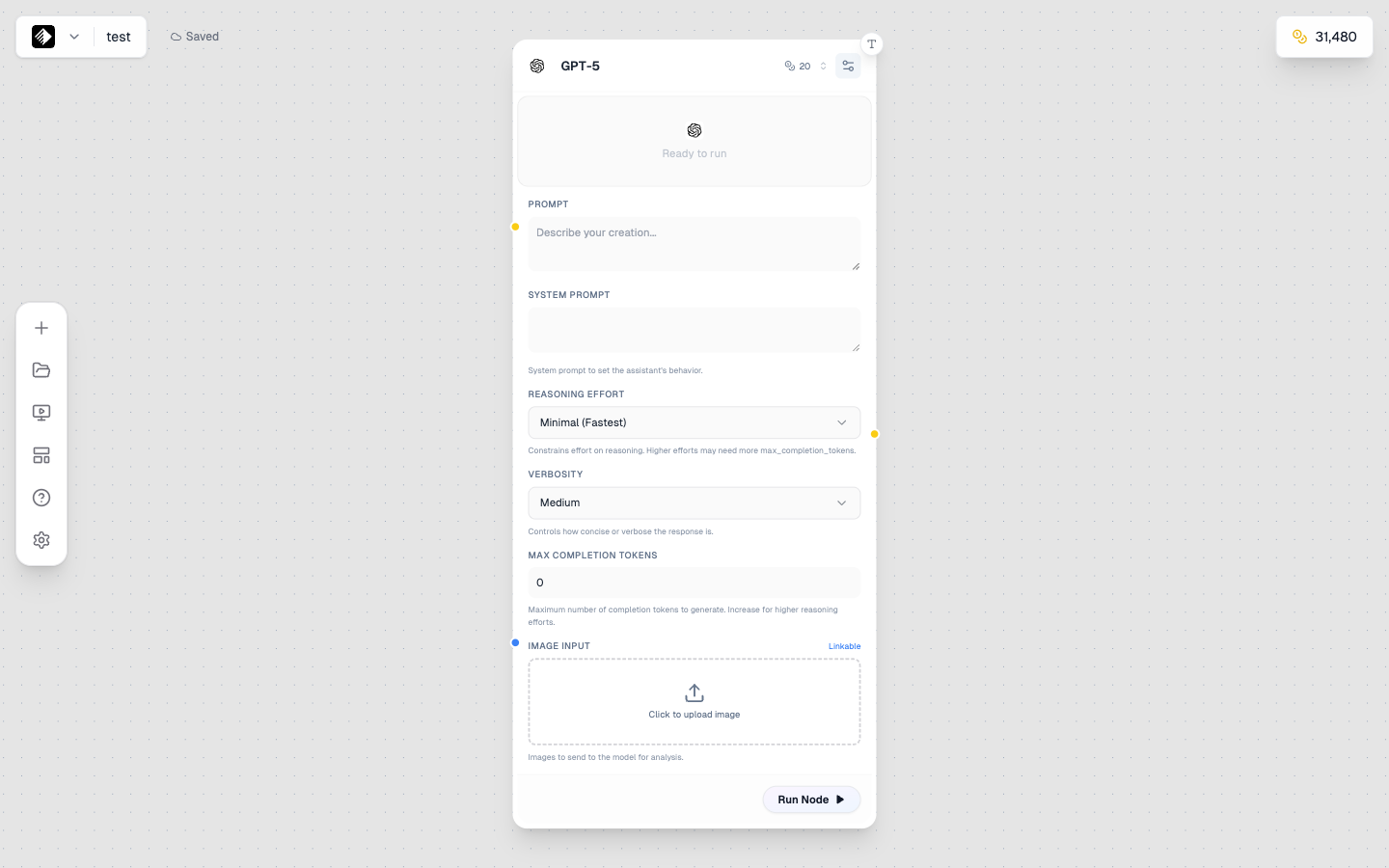
一个使用 GPT-5 的 Text node,用于 AI 文本生成。
Text nodes 负责工作流中的所有文本内容,它们可以:
- ✍️ 存储文本 — 你手动输入的内容
- 🤖 生成文本 — 使用 AI 语言模型生成
- 🔗 传递文本 — 作为 prompts 传给其它节点
两种模式(Two Modes)
Text nodes 有两种运行模式:
Manual Mode
直接在节点里输入文本。
适合:
- 写图像/视频 prompts
- 不会变化的固定文本
- 快速、简单的工作流
AI Mode
用 AI 语言模型生成或改写文本。
适合:
- 生成创意文案
- 扩写或打磨想法
- 生成变体
- 头脑风暴
添加 Text Node
- 打开左侧 node sidebar
- 在列表中找到 Text
- Drag 到画布上(或 click 添加)
Manual Mode 设置
在 manual 模式下你会看到:
| Element | Purpose |
|---|---|
| Text Area | 输入内容的区域 |
| Mode Toggle | 切换到 AI 模式 |
| Output Handle | 连接到其它节点(右侧黄色圆点) |
写好 Prompt 的要点
当你用 text node 写 prompts 时:
- 尽量 具体
- 加上 风格 与 氛围 关键词
- 需要时加入 技术细节
- 参考:Prompt Engineering
AI Mode 设置
在 AI 模式下你会看到:
| Setting | Purpose |
|---|---|
| Model | 选择 AI 语言模型 |
| System Prompt | 指导 AI 行为 |
| User Prompt | 你的请求 |
| Temperature | 创造力水平(越高越发散) |
可用模型(Available Models)
| Model | Credits | Best For |
|---|---|---|
| GPT-5 | 20 | General purpose, excellent quality |
| Gemini 2.5 Flash | 10 | Fast, good for iteration |
| Claude 4.5 Sonnet | 30 | Creative writing, nuanced content |
| DeepSeek V3.1 | 10 | Cost-effective, good quality |
| Grok 4 | 20 | Conversational, witty |
| Llama 3 70B | 14 | Open source, versatile |
| Llama 3 8B | 2 | Very fast, budget-friendly |
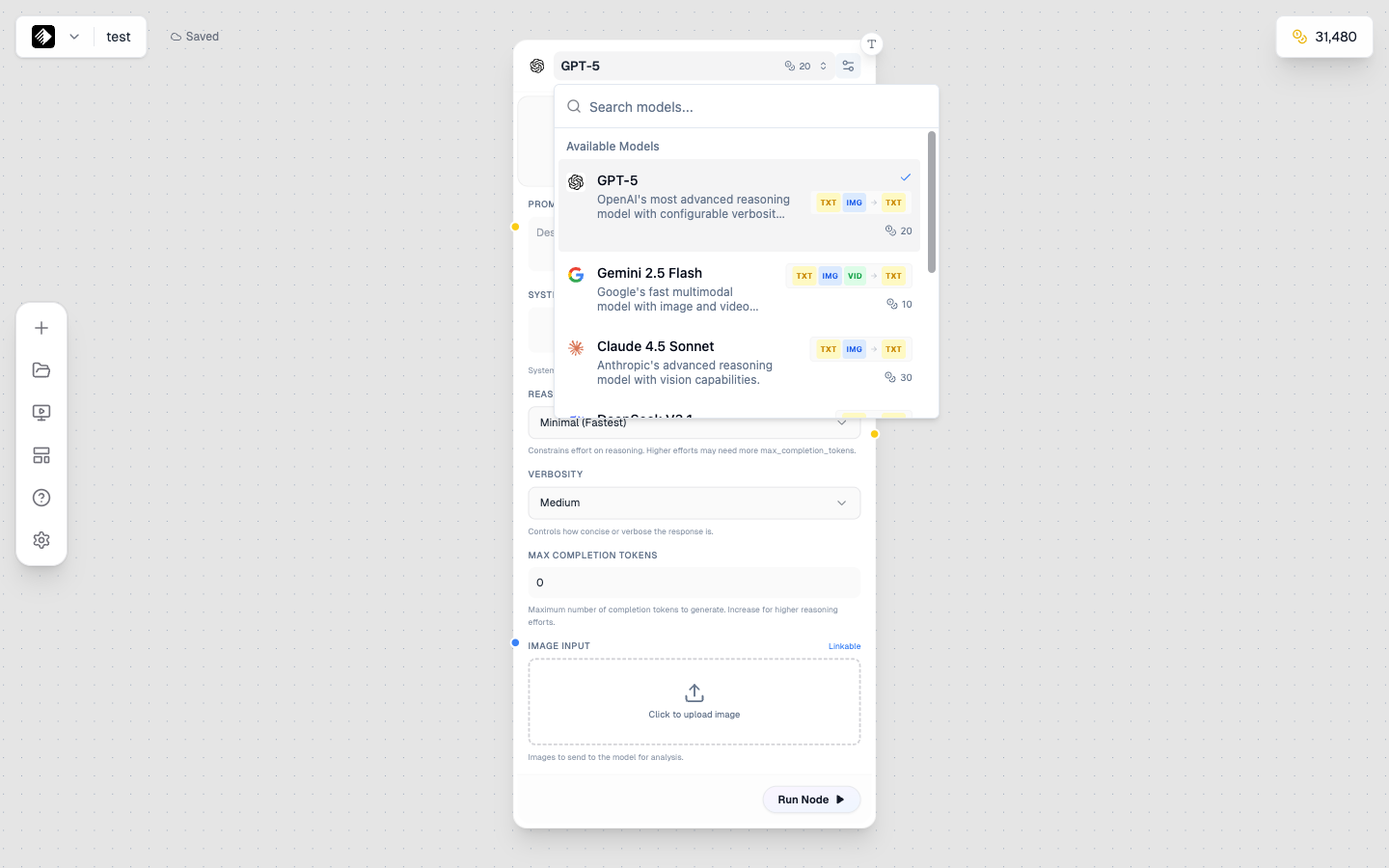
模型选择器:展示所有可用的文本模型。
使用 AI Mode
Step 1:设置 System Prompt
System prompt 告诉 AI 应该如何表现:
You are a creative marketing copywriter.
Write engaging, concise content that captures attention.
Step 2:写你的请求
在 user prompt 里写清楚你想要什么:
Write a compelling product description for a
luxury smartwatch targeting young professionals.
Step 3:调整 Temperature
- Low (0.1-0.3) — 更聚焦、更可预测
- Medium (0.5-0.7) — 平衡创造力与稳定性
- High (0.8-1.0) — 更发散、更多变化
Step 4:运行节点
点击 play 按钮生成文本。
连接 Text Nodes
Text nodes 会输出黄色连接,可连接到:
Image Nodes
把文本作为图像生成 prompt:
Prompt Template
[Text Node] → [Image Node]
Your prompt → Generated image
Video Nodes
把文本作为视频生成 prompt:
Prompt Template
[Text Node] → [Video Node]
Your prompt → Generated video
Audio Nodes
把文本作为 TTS 脚本或音乐描述:
Prompt Template
[Text Node] → [Audio Node]
Your script → Generated speech
Other Text Nodes
串联多个 text nodes 做多步骤文本处理:
Prompt Template
[Text Node 1] → [Text Node 2]
Initial idea → Refined/expanded version
工作流示例(Workflow Examples)
简单 Prompt 工作流
Prompt Template
[Text Node (Manual)] → [Image Node]
"A sunset over mountains" → Generated image
AI 增强 Prompt
Prompt Template
[Text Node (Manual)] → [Text Node (AI)] → [Image Node]
"sunset mountains" → "Dramatic sunset over snow-capped mountains, golden hour light, cinematic photography" → Generated image
文案生成
Prompt Template
[Text Node (AI)]
System: "You are a social media expert"
User: "Write 5 Instagram captions for a coffee brand"
→ Generated captions
Text Nodes 小技巧
For Manual Mode
- ✅ prompts 清晰具体
- ✅ 用换行提升可读性
- ✅ 加 style keywords
- ❌ 不要写成小说——尽量简洁
For AI Mode
- ✅ system prompt 写清楚
- ✅ 请求更具体
- ✅ 追求一致性时降低 temperature
- ✅ 追求创意时提高 temperature
- ❌ 别指望一次完美——多迭代
For Connections
- ✅ Text 可连接到几乎所有 node 类型
- ✅ 多个 text nodes 可串联做复杂处理
- ✅ 用 AI text nodes 增强手写 prompts
常见用法(Common Use Cases)
Prompt 增强
用 AI 改进基础 prompt:
- 在 Manual Text Node 写一个简单 prompt
- 连接到 AI Text Node,并设置 system prompt: "You are an expert at writing AI image prompts. Enhance this prompt with specific details, lighting, and style keywords."
- 把增强后的输出连接到 Image Node
内容生成
生成营销文案、caption 或描述:
- 设置合适的 system prompt
- 请求你需要的内容
- 复制输出或连接到其它节点
头脑风暴
生成多个点子:
- AI Text Node system prompt: "You are a creative brainstorming assistant"
- 请求多个选项: "Give me 10 different concepts for..."
- 把最好的点子拿去继续用
Troubleshooting
文本无法连接(Text Not Connecting)
- 确认从 output(右侧)拖到 input(左侧)
- 确认目标节点接受 text 输入
AI 输出太短/太长(AI Output Too Short/Long)
- 在 prompt 中明确长度
- 例如: "Write a 100-word description..." 或 "Keep it brief, 2-3 sentences"
AI 输出不符合预期(AI Output Not What You Wanted)
- 改进 system prompt
- 请求更具体
- 降低 temperature 让输出更聚焦
下一步
- Image Nodes — 把文本连接到图像生成
- Prompt Engineering — 写更好的 prompts
- Connecting Nodes — 构建更复杂工作流