Armox Logo
    PricingAcademyContact
    Login
    1. Creative AI
    2. AI Object Remover

    AI Object Remover for photos

    Brush out tourists, bags, text or street clutter. The AI rebuilds the background so the subject stays campaign-ready.

    No credit card required1000 free credits

    AI Object Remover

    cleaned campaign frames
    your street fashion photo before processing
    ‹›
    BeforeAfter
    Upload your street fashion photoJPG, PNG or WebP

    trusted by 25000+ creators

    L35 Arquitectura
    SNKH Studio
    Creaxia 63
    Founderz AI Business School
    Cornell University
    4A Architectes
    Team2 Architects
    L35 Arquitectura
    SNKH Studio
    Creaxia 63
    Founderz AI Business School
    Cornell University
    4A Architectes
    Team2 Architects
    L35 Arquitectura
    SNKH Studio
    Creaxia 63
    Founderz AI Business School
    Cornell University
    4A Architectes
    Team2 Architects
    L35 Arquitectura
    SNKH Studio
    Creaxia 63
    Founderz AI Business School
    Cornell University
    4A Architectes
    Team2 Architects

    From crowded to campaign street

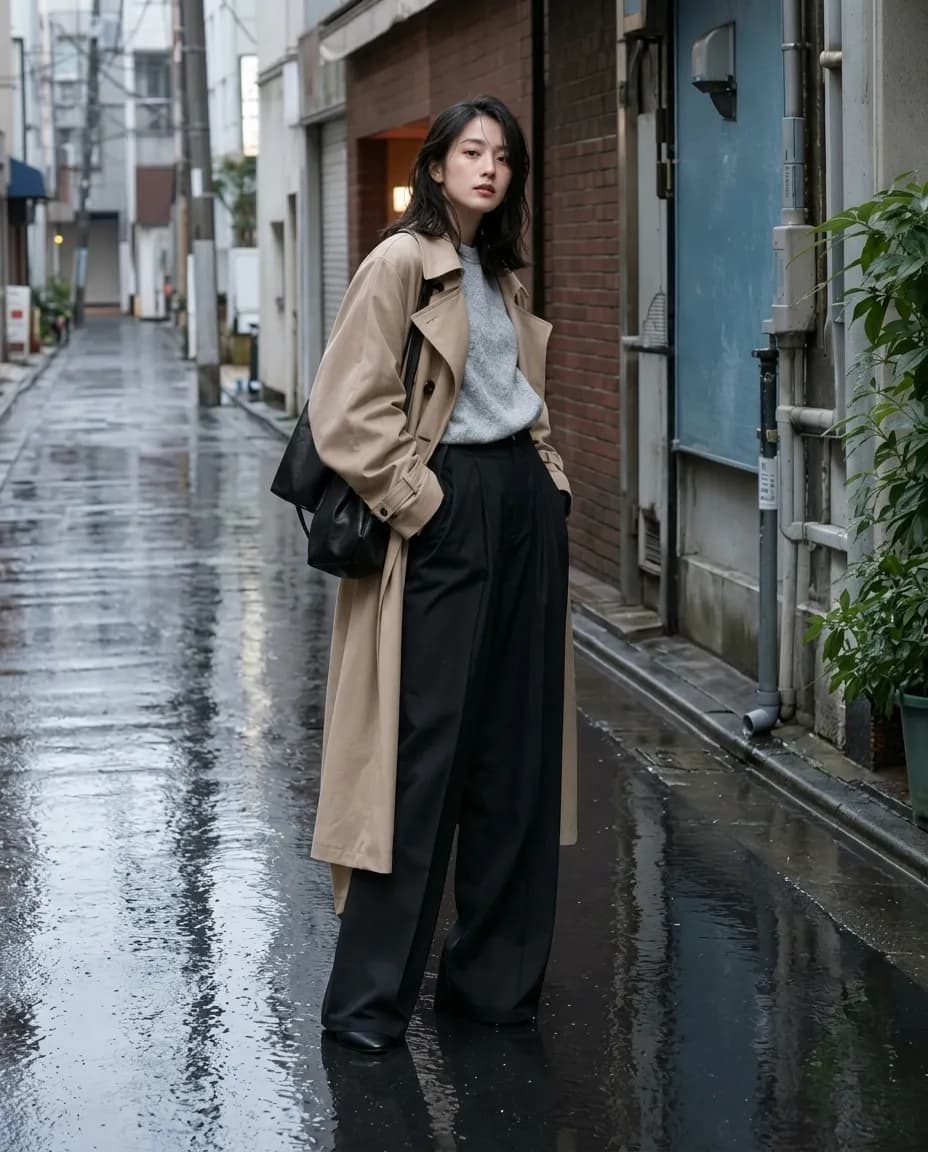
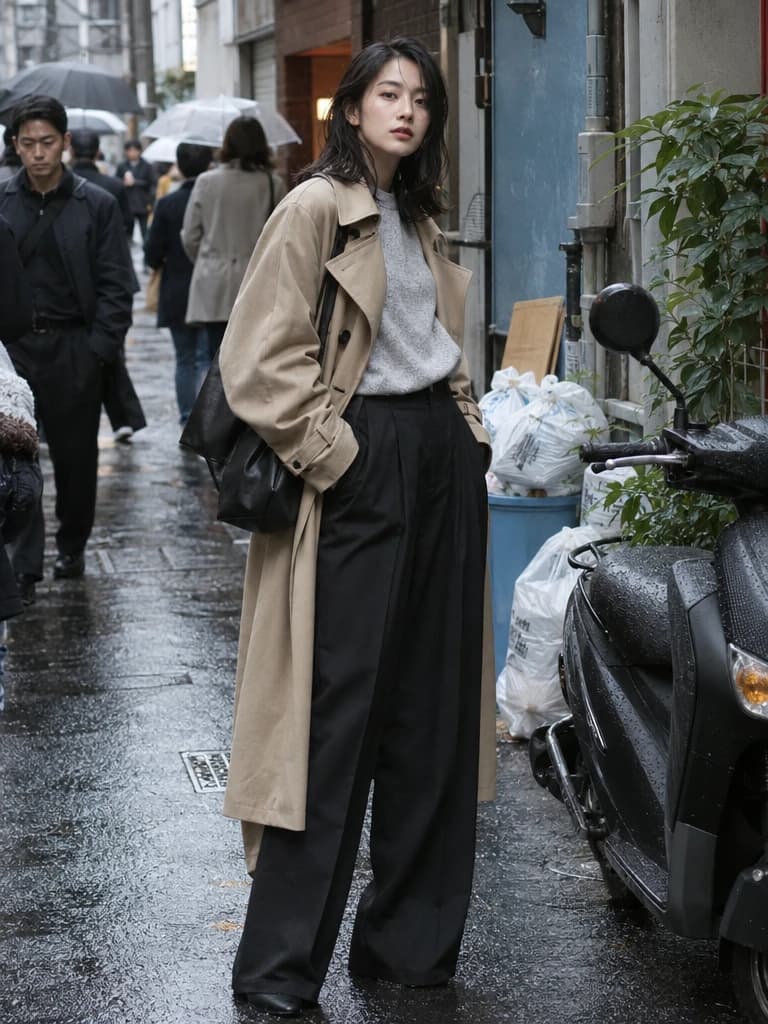
    Drag the slider: the alley empties and the same model remains in a cinematic rain-slick frame.

    AI Object Remover - after
    AI Object Remover - before
    BeforeAfter

    How It Works

    01
    Upload your photo

    Upload a JPG, PNG or WebP of your street fashion photo. The landing keeps the original File in your browser.

    02
    Preview the result

    Watch a five-second processing preview of AI Object Remover before you continue into the real app.

    03
    Open the full app

    Signed-in visitors go straight to AI Object Remover with the same image. New users continue with Google or Microsoft and keep the local draft.

    Built for AI object remover

    Erase pedestrians, bags and street clutter from lookbook frames while keeping the model pose. Campaign streets without a closed set. Try free.

    Lookbook retouching
    Lookbook retouching

    AI Object Remover keeps skin, fabric and product edges campaign-sharp for lookbook grids.

    Beauty ecommerce stills
    Beauty ecommerce stills

    Use AI object remover on vanity and product-in-hand frames before they go to PDP galleries.

    Paid social crops
    Paid social crops

    Prepare 4:5 cleaned campaign frames that already match Reels covers and story-safe margins.

    Collection consistency
    Collection consistency

    AI Object Remover helps a drop feel like one campaign when you iterate lighting, crop and wardrobe on the same faces.

    Why teams choose AI Object Remover

    Photoreal output

    AI Object Remover is tuned for campaign photography, not illustrated fashion plates.

    Ecommerce-ready crops

    Keep 4:5 heroes and product-in-hand frames that listing grids actually use.

    Local draft handoff

    The conversion mini-app stores your street fashion photo on-device until AI Object Remover confirms the uploaded URL.

    Creative catalog, not CAD

    AI object remover sits with fashion, ecommerce and film-adjacent stills — architecture rendering is a separate path.

    Explore More Creative AI

    AI Creative ToolsRemove Background AIAI Photo RetouchingAI Outpainting

    Frequently Asked Questions

    Remove unwanted objects, people and text from photos with AI.

    An AI object remover erases people, bags or street clutter from a photo and fills the gap so the scene still looks shot, not patched. Continue into the real Armox app with the original file.
    Yes. New accounts start with 1000 credits. The landing preview does not spend credits; credits apply when you run the real AI Object Remover workspace.
    Yes. The original File is stored locally and hydrated into AI Object Remover after Google or Microsoft auth. We wait until the workspace shows the uploaded URL before deleting the draft.
    Paid plans include commercial rights for campaigns, lookbooks, listings and social. Free credits are for trying AI object remover before you license campaign work.
    AI Object Remover is a real catalog app. The landing is an SEO page with a conversion preview; continuing opens the workspace so you can iterate on cleaned campaign frames.
    Yes. AI Object Remover is documented for lookbooks, product pages, beauty stills and campaign frames — the creative catalog, not architecture rendering.

    AI Object Remover Explained

    An AI object remover erases a distraction from a photo and rebuilds the pixels behind it. Upload a street, studio, or product still, mark tourists, bags, wires, or text, then preview a clean plate. The subject stays; the clutter does not.

    People search this category to remove unwanted objects, erase people, and clean product shots. Armox covers campaign stills: street clutter, hanging hardware, extra props, and small logos. You can try removing a passerby and a hanging bag from the same look before you publish.

    After you approve the clean plate, continue into the real app, then relight or extend the crop if the composition still needs room. This is inpainting for fashion and product photos, not CAD cleanup. New accounts start with 1000 free credits; the landing preview does not spend them.

    Remove street clutter

    Clear tourists, trash bags and scooters from an East Asian street-fashion alley while the trench-coat pose stays locked.

    No credit card required1000 free credits

    Armox Labs OÜ

    The best AI Creative Suite!

    Company

    • Pricing
    • Contact
    • Affiliate Program
    • Blog
    • Privacy Policy
    • Terms of Service

    Resources

    • Academy
    • Blog
    • Models
    • Use Cases

    Use Cases

    • AI Architecture Rendering
    • AI Filmmaking
    • AI Storyboard
    • Fashion AI
    • AI for Marketing
    • AI Ads Generator
    • AI for Ecommerce
    • AI Product Photography
    • Tattoo Try On
    • AI for Agencies

    Apps

    • AI Image Generator
    • AI Video Generator
    • AI Photo Editor
    • Image to Video AI
    • AI Background Remover
    • AI Image Upscaler
    • AI 3D Model Generator
    • Text to Image AI
    • LinkedIn Banner Generator
    • AI Creative Tools

    Creative alternatives

    • Midjourney Alternative
    • Runway Alternative
    • Adobe Firefly Alternative
    • Leonardo AI Alternative

    Architecture hubs

    • Rendering & Visualization
    • Redesign & Transformation
    • Environmental Effects
    • Virtual Staging
    • Editing & Enhancement
    • Video & Animation
    • Special Views & Formats
    • Solutions
    • Alternatives

    Concept generators

    • AI architecture generator
    • AI room generator
    • AI floor plan generator
    • AI kitchen design
    • AI home exterior design
    • Interior color palette generator
    • AI texture generator
    • AI PBR Texture Generator

    Compatibility

    • Render for SketchUp
    • Rendering for ArchiCAD
    • Rendering for Revit
    • Render for Rhino
    • Rendering for AutoCAD
    • Render for Blender
    Ask your AI about Armox
    ChatGPTClaudeGrokPerplexity

    © 2026 All rights reserved. Part of Armox Labs OÜ